

Overview
Each connector runs as an independent service (a Docker container in self-hosted deployments, or an ECS task on AWS) and syncs data independently. The omni-connector-manager service orchestrates all connector operations, including scheduling syncs, tracking progress, and managing concurrent operations.For instructions on adding a new connector, see the Connectors Overview.
Connector Manager
The connector-manager service is the central orchestrator for all connector operations. It provides:Configuration
Key connector-manager settings (via environment variables):
See Configuration Reference for all options.
Document Conversion
Connectors that ingest binary files (PDFs, Office docs, images) can route their text extraction through the shared Docling service. Deploy the optional Docling container first, then toggle extraction on or off and pick a quality preset from Settings → Document Conversion:- Fast — text-heavy docs, basic tables, no OCR
- Balanced (default) — accurate tables, no OCR; good tradeoff for most deployments
- Quality — OCR on, higher image scale, code/formula enrichment
DOCLING_ENABLED=true; Docker Compose deployments also need the docling profile running. Preset changes take effect immediately — no restart needed. See Configuration Reference → Document Conversion for environment-level tuning (CPU pinning, memory limits, concurrency).
Viewing Connector Status
Navigate to Settings → Integrations to manage data sources, OAuth app clients, and remote MCP servers. The page has three tabs:
The OAuth Apps tab also shows the shared redirect URI to register with providers that use Omni’s generic OAuth flow.
Some native connectors expose MCP tools as source-scoped actions. Atlassian (Rovo MCP) and Salesforce both configure their per-user OAuth client on the source’s own settings page — for example, Configure MCP OAuth client on the Salesforce source — rather than on the OAuth Apps tab. Each user then authorizes the provider individually before the MCP tools become available to them.
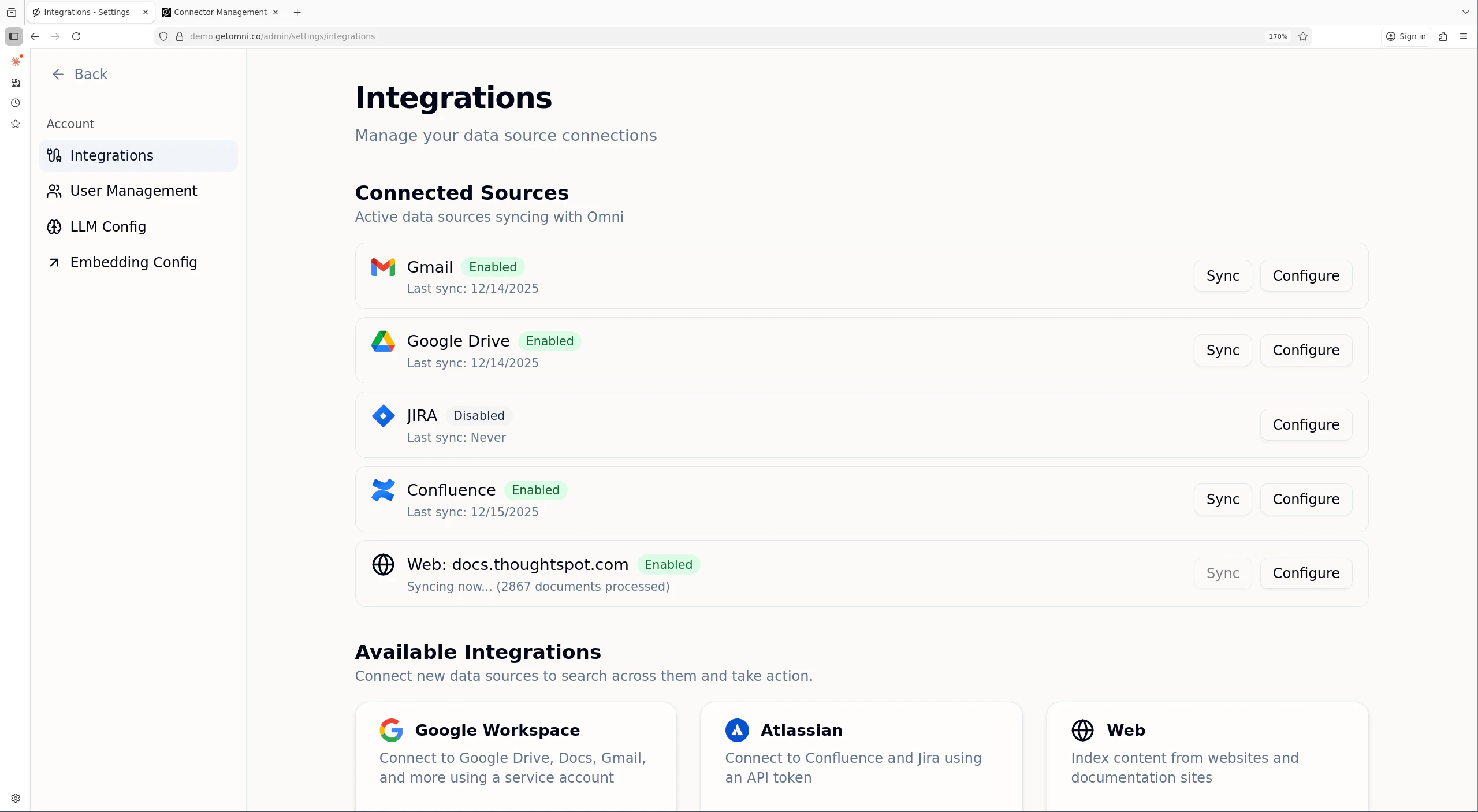
The Integrations page shows connected sources and available connectors
- Enabled/Disabled status
- Last sync timestamp
- Sync progress when a sync is running, including scanned and updated counts
- Indexed document count
- Unhealthy status and latest error when scheduled syncs have been paused after repeated failures
Remote MCP Servers
The MCP tab lets admins connect to external MCP servers over HTTP(S) and use their tools and resources inside Omni, with no connector container required. Each server is created with a display name, an endpoint URL, an app/source slug (2-50 lowercase letters, numbers, hyphens, or underscores; cannot be changed later), and one of three auth modes:
Before saving, use Test connection to probe the server. Omni detects the server name, version, and its tool/resource counts, and suggests an app slug. You can also choose whether to expose write-capable tools; servers created without write tools show a Read-only badge and their destructive tools are withheld from the assistant.
Each remote MCP server appears as a source on the Sources tab once created, with tool and resource counts surfaced from the probe, and can be opened from the MCP tab to manage its settings.
Enabling and Disabling Connectors
Each connector can be enabled or disabled independently. A disabled connector:- Stops syncing new content
- Cancels any running sync for that source on the next scheduler tick
- Retains previously indexed documents
- Can be re-enabled at any time
Sync Operations
Automatic Sync
Connectors automatically sync on a schedule. After the initial full sync, incremental syncs run periodically to capture new and updated content. Admins can adjust a source’s Sync Interval from the source settings page. Presets range from every 30 minutes to weekly, and custom intervals can be set between 1 minute and 365 days. The scheduler uses the source’s latest successful sync plus this interval to decide when the next scheduled sync is due.Manual Sync
To trigger a manual sync:- Navigate to Settings → Integrations
- Find the source
- Click Sync
Removing a Connector
To disconnect a data source:- Navigate to Settings → Integrations
- Click Settings for the source
- Click Delete Permanently
- Confirm the removal
- The source is marked for deletion
- All indexed documents, credentials, and sync history for that source are deleted
- Users will no longer see results from that source
Troubleshooting
Connector shows “Error” status
Check the connector logs. For Docker Compose deployments:- Expired or revoked credentials
- API rate limiting
- Network connectivity problems
- Connector-manager unable to reach connector service
Source shows unhealthy or sync seems stuck
If a source is marked Unhealthy, scheduled syncs have been paused after repeated scheduled failures. Manual sync failures are treated as user-initiated probes and do not trip the scheduled-sync circuit breaker. The source settings page includes a Sync history panel with the latest 10 scheduled runs, their type, duration, scanned/processed/updated counts, and errors. If a sync has been running for an unusually long time:- Check the connector-manager logs for heartbeat failures and auto-resume attempts:
- Check the connector logs for errors
- If the connector restarted, connector-manager will detect the lost run on its next scheduler tick and re-trigger it from the last checkpoint (up to 3 resume attempts).
- Syncs that continue to make no progress are marked failed after
STALE_SYNC_TIMEOUT_MINUTESof inactivity (default: 60 minutes). - Restart the connector service if it appears hung rather than progressing.
Connector not receiving sync requests
Verify connector-manager can reach the connector:- Check connector URL configuration:
- Test connectivity from connector-manager:
- Check connector-manager logs for connection errors
Too many concurrent syncs
If syncs are queuing or timing out:- Check current sync count in connector-manager logs
- Adjust concurrency limits:
MAX_CONCURRENT_SYNCS(default: 10)MAX_CONCURRENT_SYNCS_PER_TYPE(default: 3)
- Consider staggering sync schedules for different sources