> ## Documentation Index
> Fetch the complete documentation index at: https://docs.getomni.co/llms.txt
> Use this file to discover all available pages before exploring further.
# Chat vs Search
> Two ways to find information in Omni
Omni offers two modes for finding information. Toggle between them using the icons below the search bar.
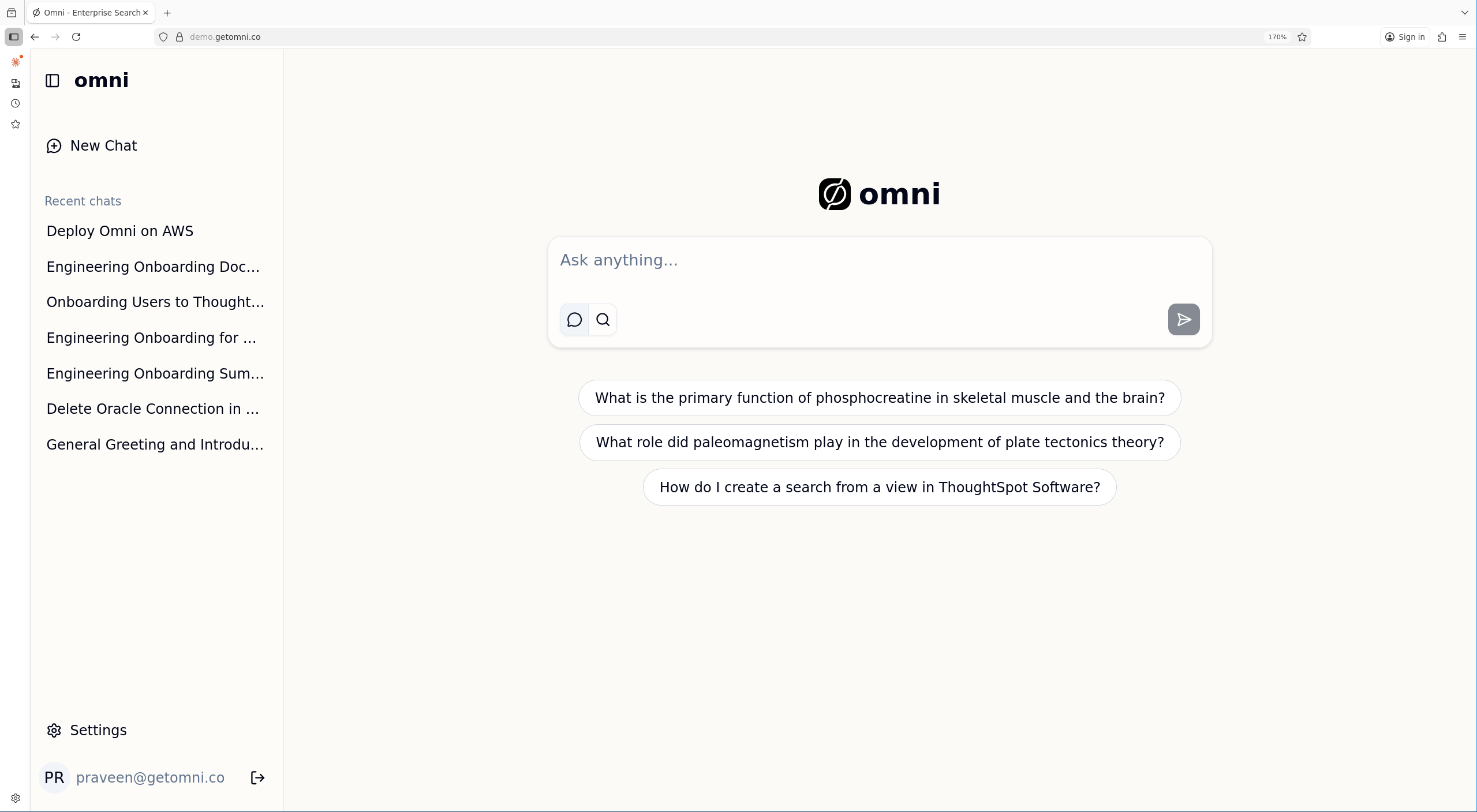 ## Chat Mode
Use Chat mode when you want AI-synthesized answers with citations. The assistant searches your sources, reads relevant documents, and provides a coherent response.
## Chat Mode
Use Chat mode when you want AI-synthesized answers with citations. The assistant searches your sources, reads relevant documents, and provides a coherent response.
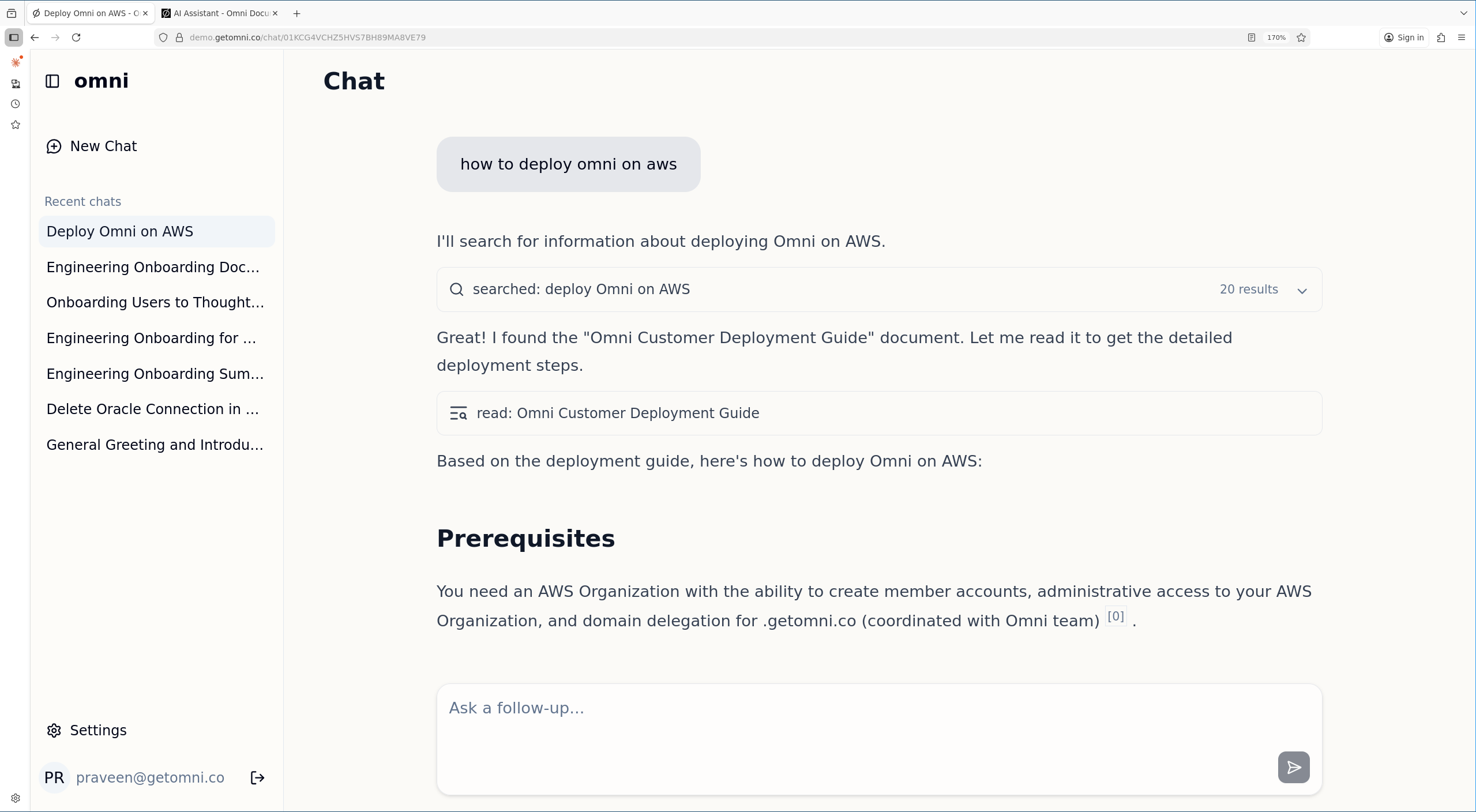 **Best for:**
* Questions that span multiple documents
* Summarizing information
* Follow-up questions in a conversation
## Search Mode
Use Search mode when you want direct links to documents. Results are ranked by relevance and displayed as a traditional search results page.
**Best for:**
* Finding a specific document
* Quick document lookup
* Browsing available content
## When to Use Each
| Use Chat Mode | Use Search Mode |
| ------------------------------------------------------- | ----------------------- |
| "What were the key decisions from the product meeting?" | "Q3 sales report" |
| "Summarize our refund policy" | "employee handbook" |
| "How do I set up SSO?" | "SSO configuration doc" |
## Filters and Operators
Both modes accept the same [search operators](/user-guide/search#search-operators) — `in:`, `type:`, `by:`, `before:`, `after:` — plus connector-provided operators such as Slack `channel:` or Jira/GitHub `status:`. The filter panel (source, content type, author, date range) applies the same underlying filters. In chat mode, you can also ask the assistant to apply filters in natural language (e.g. "find recent engineering docs in Confluence"), and it will translate them into tool-level filters on your behalf.
## File Attachments (Chat Only)
Chat mode lets you attach a file to a message (up to 50 MB). The assistant reads it alongside any indexed documents it retrieves. See [AI Assistant → File Attachments](/user-guide/ai-assistant#file-attachments) for details. Search mode doesn't accept attachments — it only queries the index.
## Document References (Chat Only)
Chat mode lets you reference specific indexed documents by typing `@` followed by a search query. Select a document from the typeahead menu to inject its full content into the chat context. See [AI Assistant → Document References](/user-guide/ai-assistant#document-references) for details. Search mode does not support document references.
**Best for:**
* Questions that span multiple documents
* Summarizing information
* Follow-up questions in a conversation
## Search Mode
Use Search mode when you want direct links to documents. Results are ranked by relevance and displayed as a traditional search results page.
**Best for:**
* Finding a specific document
* Quick document lookup
* Browsing available content
## When to Use Each
| Use Chat Mode | Use Search Mode |
| ------------------------------------------------------- | ----------------------- |
| "What were the key decisions from the product meeting?" | "Q3 sales report" |
| "Summarize our refund policy" | "employee handbook" |
| "How do I set up SSO?" | "SSO configuration doc" |
## Filters and Operators
Both modes accept the same [search operators](/user-guide/search#search-operators) — `in:`, `type:`, `by:`, `before:`, `after:` — plus connector-provided operators such as Slack `channel:` or Jira/GitHub `status:`. The filter panel (source, content type, author, date range) applies the same underlying filters. In chat mode, you can also ask the assistant to apply filters in natural language (e.g. "find recent engineering docs in Confluence"), and it will translate them into tool-level filters on your behalf.
## File Attachments (Chat Only)
Chat mode lets you attach a file to a message (up to 50 MB). The assistant reads it alongside any indexed documents it retrieves. See [AI Assistant → File Attachments](/user-guide/ai-assistant#file-attachments) for details. Search mode doesn't accept attachments — it only queries the index.
## Document References (Chat Only)
Chat mode lets you reference specific indexed documents by typing `@` followed by a search query. Select a document from the typeahead menu to inject its full content into the chat context. See [AI Assistant → Document References](/user-guide/ai-assistant#document-references) for details. Search mode does not support document references.