> ## Documentation Index
> Fetch the complete documentation index at: https://docs.getomni.co/llms.txt
> Use this file to discover all available pages before exploring further.
# Connector Management
> Monitor and manage your connected data sources
## Overview
Each connector runs as an independent service (a Docker container in self-hosted deployments, or an ECS task on AWS) and syncs data independently. The **omni-connector-manager** service orchestrates all connector operations, including scheduling syncs, tracking progress, and managing concurrent operations.
For instructions on adding a new connector, see the [Connectors Overview](/connectors/overview).
## Connector Manager
The connector-manager service is the central orchestrator for all connector operations. It provides:
| Capability | Description |
| ----------------------------- | --------------------------------------------------------------------------------------------------------------------------------------------------------------------------------------------------------------------------------------------- |
| **Sync Orchestration** | Triggers syncs on-demand or on schedule |
| **Progress Tracking** | Real-time sync progress via Server-Sent Events |
| **Concurrency Control** | Limits concurrent syncs (default: 10 global, 3 per type) |
| **Stale Sync Detection** | Marks hung syncs as failed after `STALE_SYNC_TIMEOUT_MINUTES` of inactivity |
| **Interrupted Sync Recovery** | Polls each connector's `/sync/{id}` endpoint on every scheduler tick; if a connector has lost the run (typically due to a restart), re-triggers it so it resumes from the last persisted checkpoint (up to 3 attempts before failing the run) |
| **Per-source Scheduling** | Stores a sync interval on each source so admins can tune high-volume and low-volume integrations separately |
| **SDK Endpoints** | API for custom connectors built with Python/TypeScript SDK |
### Configuration
Key connector-manager settings (via environment variables):
| Variable | Default | Description |
| -------------------------------- | ------- | ---------------------------------------------------------------------------- |
| `MAX_CONCURRENT_SYNCS` | `10` | Maximum concurrent syncs across all sources |
| `MAX_CONCURRENT_SYNCS_PER_TYPE` | `3` | Maximum concurrent syncs per connector type |
| `SCHEDULER_INTERVAL_SECONDS` | `30` | How often the scheduler checks for due syncs |
| `STALE_SYNC_TIMEOUT_MINUTES` | `60` | Timeout to mark a sync as stale/failed |
| `EXTRACTION_CONCURRENCY` | `2` | Maximum concurrent document extraction requests handled by connector-manager |
| `EXTRACTION_RETRY_AFTER_SECONDS` | `30` | Retry delay advertised when extraction capacity is saturated |
See [Configuration Reference](/deployment/configuration) for all options.
## Document Conversion
Connectors that ingest binary files (PDFs, Office docs, images) can route their text extraction through the shared Docling service. Deploy the optional Docling container first, then toggle extraction on or off and pick a quality preset from **Settings** → **Document Conversion**:
* **Fast** — text-heavy docs, basic tables, no OCR
* **Balanced** *(default)* — accurate tables, no OCR; good tradeoff for most deployments
* **Quality** — OCR on, higher image scale, code/formula enrichment
The settings page is shown when `DOCLING_ENABLED=true`; Docker Compose deployments also need the `docling` profile running. Preset changes take effect immediately — no restart needed. See [Configuration Reference → Document Conversion](/deployment/configuration#document-conversion-docling) for environment-level tuning (CPU pinning, memory limits, concurrency).
## Viewing Connector Status
Navigate to **Settings** → **Integrations** to manage data sources and OAuth app clients. The page has two tabs:
| Tab | Purpose |
| -------------- | ------------------------------------------------------------------------------------------------ |
| **Sources** | View connected sources, connect new integrations, trigger manual syncs, and open source settings |
| **OAuth Apps** | Configure OAuth clients for connector actions that need per-user authorization |
The OAuth Apps tab also shows the shared redirect URI to register with providers that use Omni's generic OAuth flow.
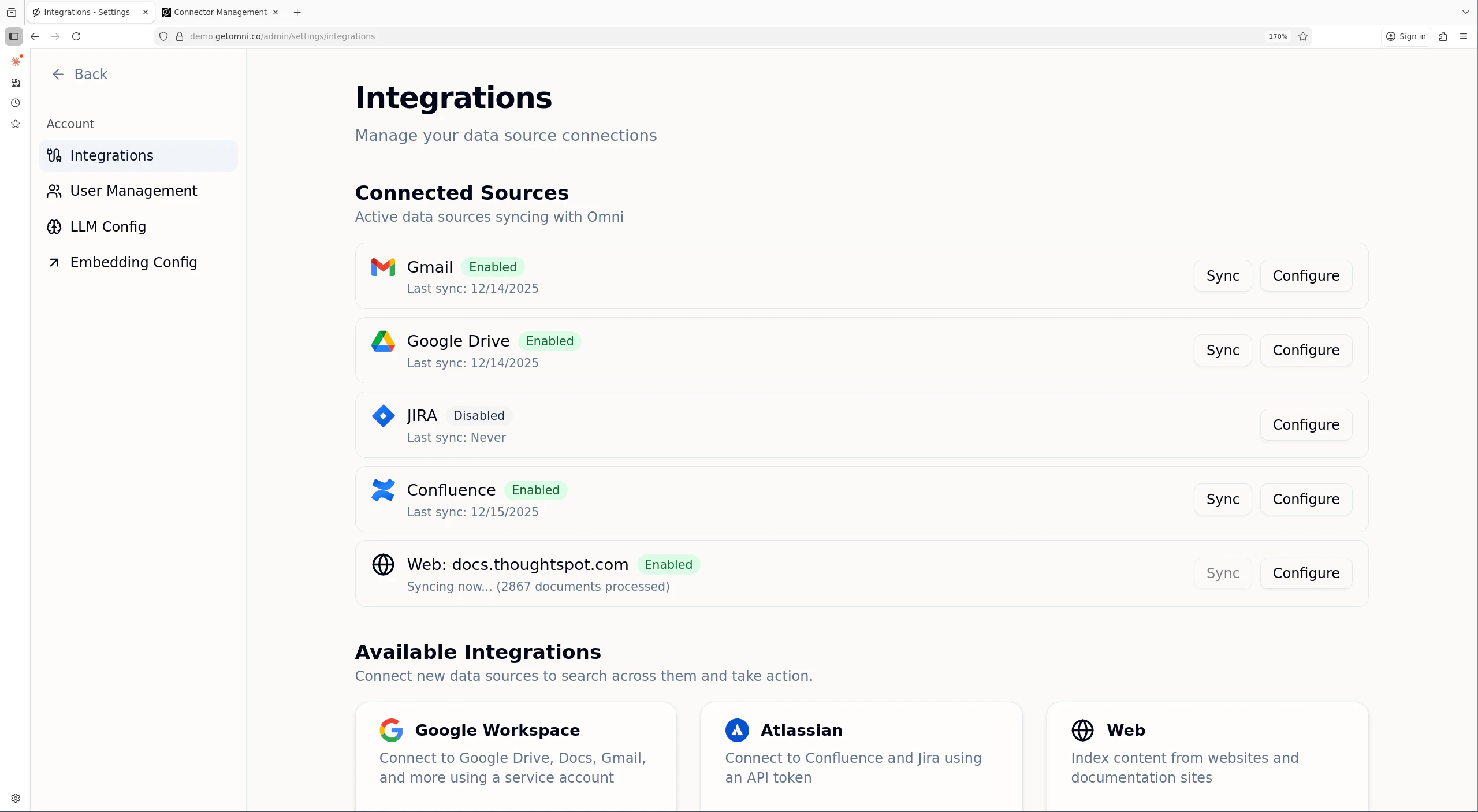 For each source, you can see:
* **Enabled/Disabled** status
* **Last sync** timestamp
* **Sync progress** when a sync is running, including scanned and updated counts
* **Indexed document count**
* **Unhealthy** status and latest error when scheduled syncs have been paused after repeated failures
## Enabling and Disabling Connectors
Each connector can be enabled or disabled independently. A disabled connector:
* Stops syncing new content
* Cancels any running sync for that source on the next scheduler tick
* Retains previously indexed documents
* Can be re-enabled at any time
To toggle a connector's status, click **Settings** for that source and change the enabled setting.
## Sync Operations
### Automatic Sync
Connectors automatically sync on a schedule. After the initial full sync, incremental syncs run periodically to capture new and updated content.
Admins can adjust a source's **Sync Interval** from the source settings page. Presets range from every 30 minutes to weekly, and custom intervals can be set between 1 minute and 365 days. The scheduler uses the source's latest successful sync plus this interval to decide when the next scheduled sync is due.
### Manual Sync
To trigger a manual sync:
1. Navigate to **Settings** → **Integrations**
2. Find the source
3. Click **Sync**
You can only trigger a manual sync if no sync is currently running. If a sync is in progress, the button will be disabled.
## Removing a Connector
To disconnect a data source:
1. Navigate to **Settings** → **Integrations**
2. Click **Settings** for the source
3. Click **Delete Permanently**
4. Confirm the removal
When you remove a source:
* The source is marked for deletion
* All indexed documents, credentials, and sync history for that source are deleted
* Users will no longer see results from that source
## Troubleshooting
### Connector shows "Error" status
Check the connector logs. For Docker Compose deployments:
```bash theme={null}
# Check specific connector logs
docker logs omni--connector
# Check connector-manager logs for orchestration issues
docker logs omni-connector-manager
```
For AWS deployments, check CloudWatch Logs for the connector's ECS task.
Common issues:
* Expired or revoked credentials
* API rate limiting
* Network connectivity problems
* Connector-manager unable to reach connector service
### Source shows unhealthy or sync seems stuck
If a source is marked **Unhealthy**, scheduled syncs have been paused after repeated scheduled failures. Manual sync failures are treated as user-initiated probes and do not trip the scheduled-sync circuit breaker.
The source settings page includes a **Sync history** panel with the latest 10 scheduled runs, their type, duration, scanned/processed/updated counts, and errors.
If a sync has been running for an unusually long time:
1. Check the connector-manager logs for heartbeat failures and auto-resume attempts:
```bash theme={null}
docker logs omni-connector-manager | grep -iE "stale|timeout|lost|resume"
```
2. Check the connector logs for errors
3. If the connector restarted, connector-manager will detect the lost run on its next scheduler tick and re-trigger it from the last checkpoint (up to 3 resume attempts).
4. Syncs that continue to make no progress are marked failed after `STALE_SYNC_TIMEOUT_MINUTES` of inactivity (default: 60 minutes).
5. Restart the connector service if it appears hung rather than progressing.
### Connector not receiving sync requests
Verify connector-manager can reach the connector:
1. Check connector URL configuration:
```bash theme={null}
# Ensure CONNECTOR__URL is set correctly
echo $CONNECTOR_GOOGLE_URL
```
2. Test connectivity from connector-manager:
```bash theme={null}
docker exec omni-connector-manager curl http://:/health
```
3. Check connector-manager logs for connection errors
### Too many concurrent syncs
If syncs are queuing or timing out:
1. Check current sync count in connector-manager logs
2. Adjust concurrency limits:
* `MAX_CONCURRENT_SYNCS` (default: 10)
* `MAX_CONCURRENT_SYNCS_PER_TYPE` (default: 3)
3. Consider staggering sync schedules for different sources
For each source, you can see:
* **Enabled/Disabled** status
* **Last sync** timestamp
* **Sync progress** when a sync is running, including scanned and updated counts
* **Indexed document count**
* **Unhealthy** status and latest error when scheduled syncs have been paused after repeated failures
## Enabling and Disabling Connectors
Each connector can be enabled or disabled independently. A disabled connector:
* Stops syncing new content
* Cancels any running sync for that source on the next scheduler tick
* Retains previously indexed documents
* Can be re-enabled at any time
To toggle a connector's status, click **Settings** for that source and change the enabled setting.
## Sync Operations
### Automatic Sync
Connectors automatically sync on a schedule. After the initial full sync, incremental syncs run periodically to capture new and updated content.
Admins can adjust a source's **Sync Interval** from the source settings page. Presets range from every 30 minutes to weekly, and custom intervals can be set between 1 minute and 365 days. The scheduler uses the source's latest successful sync plus this interval to decide when the next scheduled sync is due.
### Manual Sync
To trigger a manual sync:
1. Navigate to **Settings** → **Integrations**
2. Find the source
3. Click **Sync**
You can only trigger a manual sync if no sync is currently running. If a sync is in progress, the button will be disabled.
## Removing a Connector
To disconnect a data source:
1. Navigate to **Settings** → **Integrations**
2. Click **Settings** for the source
3. Click **Delete Permanently**
4. Confirm the removal
When you remove a source:
* The source is marked for deletion
* All indexed documents, credentials, and sync history for that source are deleted
* Users will no longer see results from that source
## Troubleshooting
### Connector shows "Error" status
Check the connector logs. For Docker Compose deployments:
```bash theme={null}
# Check specific connector logs
docker logs omni--connector
# Check connector-manager logs for orchestration issues
docker logs omni-connector-manager
```
For AWS deployments, check CloudWatch Logs for the connector's ECS task.
Common issues:
* Expired or revoked credentials
* API rate limiting
* Network connectivity problems
* Connector-manager unable to reach connector service
### Source shows unhealthy or sync seems stuck
If a source is marked **Unhealthy**, scheduled syncs have been paused after repeated scheduled failures. Manual sync failures are treated as user-initiated probes and do not trip the scheduled-sync circuit breaker.
The source settings page includes a **Sync history** panel with the latest 10 scheduled runs, their type, duration, scanned/processed/updated counts, and errors.
If a sync has been running for an unusually long time:
1. Check the connector-manager logs for heartbeat failures and auto-resume attempts:
```bash theme={null}
docker logs omni-connector-manager | grep -iE "stale|timeout|lost|resume"
```
2. Check the connector logs for errors
3. If the connector restarted, connector-manager will detect the lost run on its next scheduler tick and re-trigger it from the last checkpoint (up to 3 resume attempts).
4. Syncs that continue to make no progress are marked failed after `STALE_SYNC_TIMEOUT_MINUTES` of inactivity (default: 60 minutes).
5. Restart the connector service if it appears hung rather than progressing.
### Connector not receiving sync requests
Verify connector-manager can reach the connector:
1. Check connector URL configuration:
```bash theme={null}
# Ensure CONNECTOR__URL is set correctly
echo $CONNECTOR_GOOGLE_URL
```
2. Test connectivity from connector-manager:
```bash theme={null}
docker exec omni-connector-manager curl http://:/health
```
3. Check connector-manager logs for connection errors
### Too many concurrent syncs
If syncs are queuing or timing out:
1. Check current sync count in connector-manager logs
2. Adjust concurrency limits:
* `MAX_CONCURRENT_SYNCS` (default: 10)
* `MAX_CONCURRENT_SYNCS_PER_TYPE` (default: 3)
3. Consider staggering sync schedules for different sources